Enquest HCM: all of people management on one platform
Payroll, attendance, leave, performance and recruitment — with a mobile app for clocking in on the field.
Format
Each solution (HR Master, PayMaster and Time Master) can be purchased separately or together. SaaS: hosted and managed, by subscription. On-premise: installed on the company's servers, with full data control and no dependence on the internet. 5-stage implementation, training and local support by INOLAB.
What it is
Three solutions — buy only what you need
All three integrate automatically when used together.
HR Master — people management
PayMaster — payroll
Time Master — attendance
Add-on — AI assistant
How to buy
Pricing on request, based on solutions, modules and number of employees.
Time Master only
Attendance with terminals and app.
- Fingerprint and facial recognition terminals
- Shifts, overtime and reports
- Mobile app with geolocation and selfie
- Exports to your payroll system
PayMaster only
Payroll processing.
- Multi-company, site and currency
- Earnings, deductions, loans and back pay
- Emailed payslips and bank files
- Export to accounting / ERP
HR Master only
People and talent management.
- Digital employee file and self-service portal
- Leave
- Performance, competencies and succession
- Recruitment, training, travel and assets
Complete suite
HR Master + PayMaster + Time Master, integrated.
- Attendance and leave flow into payroll automatically
- One record per employee
- Payroll postings straight into the ERP
- Executive dashboard and Power BI
- AI assistant as an option
PayMaster: how payroll works
1. Data and attendance
2. Earnings and deductions
3. Pay and back-pay calculation
4. Obligations and payslips
5. Transfer and close
PayMaster: features
-
Multi-company and multi-site
Payroll for several companies, branches and sites on one platform.
-
Multi-currency
Employees paid in different currencies.
-
Every type of contract
Permanent, temporary and contract staff, with flexible pay structures.
-
Custom earnings and deductions
Pay components configured to company policy.
-
Automatic back pay
Retroactive reviews and raises calculated automatically.
-
Loans and savings
Loan tracking, deduction schedules and savings plans.
-
Built-in legislation
Tax tables and contributions calculated per country, with no manual work.
-
Digital payslips
Emailed to every employee each pay run.
-
Bank files
Transfer templates compatible with the main banks, and reconciliation.
-
Security and audit
Role-based access and a full log of who changed what.
Time Master: time and attendance
-
Biometric terminals
Fingerprint and facial recognition for secure, contactless clocking.
-
Shifts and schedules
Flexible shift creation with automatic allocation rules and holiday calendar.
-
Overtime
Rule-based calculation with multi-level approval.
-
Absences and corrections
Absence tracking with notes and time-correction requests.
-
100+ reports
Clock-ins and outs, absenteeism, presence, attendance register, overtime and labour costs.
-
Web and desktop
Several administrators in the browser; manages hundreds of terminals and thousands of employees.
-
Link to payroll
Absences, lateness, overtime and leave flow to PayMaster or another payroll system.
Time Master mobile app
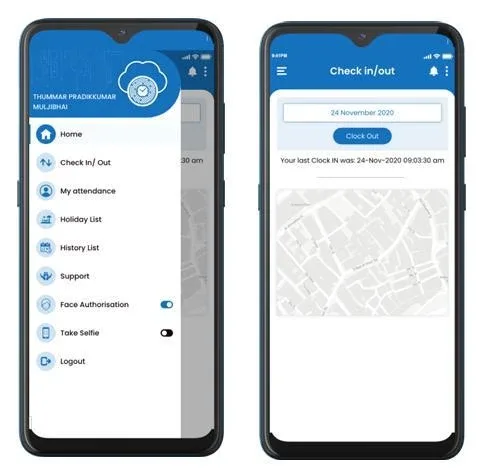
Mobile app: features
Android and iOS. Integrated with the Time Master web and desktop versions. Facial recognition is an optional module.
Clock in on the phone
Geolocation (Google Maps)
Authorised zones (geofencing)
Selfie and facial recognition
Records and schedules
Correction requests
Reports in the app
HR self-service
HR Master: people management, module by module
-
Digital employee file
Personal, legal, bank and medical data, documents (contracts, IDs, certificates) and career history.
-
Lifecycle
Promotions, transfers, role changes and exits with approval workflows.
-
Self-service portal and manager dashboard
Employees handle their requests; managers approve and follow the team.
-
Leave
Real-time balances, automatic accrual, carry-forward, encashment; annual, sick, maternity, paternity and custom types; team calendar.
-
Performance
Quarterly, half-yearly or annual cycles, KPIs, self-assessment, 360° appraisal and history.
-
Competencies
Library per role, self-assessment with evidence and manager evaluation.
-
Recruitment and careers portal
Job requisition, postings, online applications, skills screening, interviews, offer letters and onboarding.
-
Training, learning and development
Training needs, online, classroom and webinar courses, content, online and offline assessments, mentoring and certificates.
-
Travel and expenses
Requests, approvals, itineraries (flights, hotels), expenses and reimbursements paid with salary.
-
Employee assets
IT equipment, phones, vehicles and furniture issued, with maintenance and warranties.
-
Disciplinary and grievances
Cases from start to resolution, warning templates and audit history; separate grievance channel.
-
Surveys, feedback and awards
Engagement surveys, anonymous feedback, employee of the month, peer recognition and points.
-
Succession
Critical positions, talent with readiness levels and development plans.
-
Medical and project management
Medical records and health benefits; project allocation and timesheets.
Integrations and analytics
-
Power BI
Real-time connection and ready-made headcount, payroll, turnover and performance templates.
-
Executive dashboard (CHRO/CXO)
Headcount by department, turnover, time to hire, payroll accuracy, training and engagement.
-
REST API and webhooks
Every module exposed through a secure API (OAuth 2.0), with documentation and a sandbox.
-
ERP connection
Payroll postings straight into accounting and synchronised cost centres.
-
Other applications
Microsoft Teams, Slack, Zoom, email, biometric devices and custom apps.
SaaS or on-premise
Choose where the system runs.
SaaS (cloud)
Hosted and managed by the vendor.
- Running in days
- No servers or infrastructure
- Automatic updates
- Daily backups and disaster recovery
- Subscription that grows with you
On-premise
Installed on the company's servers.
- All data in-house
- Works without depending on the internet
- Deep customisation
- Integration with existing ERP and systems
5-stage implementation
1. Project kick-off
2. Installation
3. Business mapping
4. Data, training and acceptance
5. Go-live and support
Support and technical requirements
Biometric terminals
Advantages
Modular purchase
Error-free payroll
No more buddy punching
Less work for HR
Built for Africa
Secure and scalable
Who it is for
Distribution and retail
Services and healthcare
Restaurants
NGOs and field work
Manufacturing and groups
Frequently asked questions
Can I buy attendance only or payroll only?
Yes. HR Master, PayMaster and Time Master are sold separately. Time Master can export to your current payroll system, and PayMaster can import attendance from other systems.
What is the difference between HR Master, PayMaster and Time Master?
Time Master records when and where people work. PayMaster turns that — plus earnings and deductions — into each person's pay. HR Master manages everything else about people: file, leave, performance, recruitment, training and career.
Does the app work on iPhone?
Yes, it is available for Android and iOS.
Is facial recognition included?
On the biometric terminals, yes. In the app, face verification is an optional module at a small extra cost; selfie and geolocation are included.
Does it handle several companies and currencies?
Yes — PayMaster is multi-company, multi-site and multi-currency on one platform.
Does it integrate with our ERP?
Yes, via API and exports: payroll postings go to accounting and cost centres stay in sync.
See Enquest HCM in action
Tell us how you work today — we'll reply with a tailored quote.